Priročnik Samsung DA-F60 Zvočnik

Potrebujete priročnik za vaš Samsung DA-F60 Zvočnik? Spodaj si lahko brezplačno ogledate in prenesete PDF priročnik v slovenščini. Ta izdelek ima trenutno 5 pogosto zastavljeni vprašanji, 0 komentarjev in ima 0 glasov. Če to ni priročnik, ki ga želite, nas kontaktirajte.

Ali je vaš izdelek okvarjen in v priročniku ne najdete rešitve? Obiščite Repair Café za brezplačno popravilo.

Priročnik

Loading…
English4
f You may be required to enter a PIN code (password)
when connecting the Bluetooth device to the Wireless
Audio Portable. If the PIN code input window appears,
enter <0000>.
f The Wireless Audio Portable supports SBC data
(44.1kHz, 48kHz).
f The AVRCP feature is not supported.
f Connect only to a Bluetooth device that supports the
A2DP (AV) function.
f You cannot connect to a Bluetooth device that supports
only the HF (Hands Free) function.
f Only one Bluetooth device can be paired at a time.
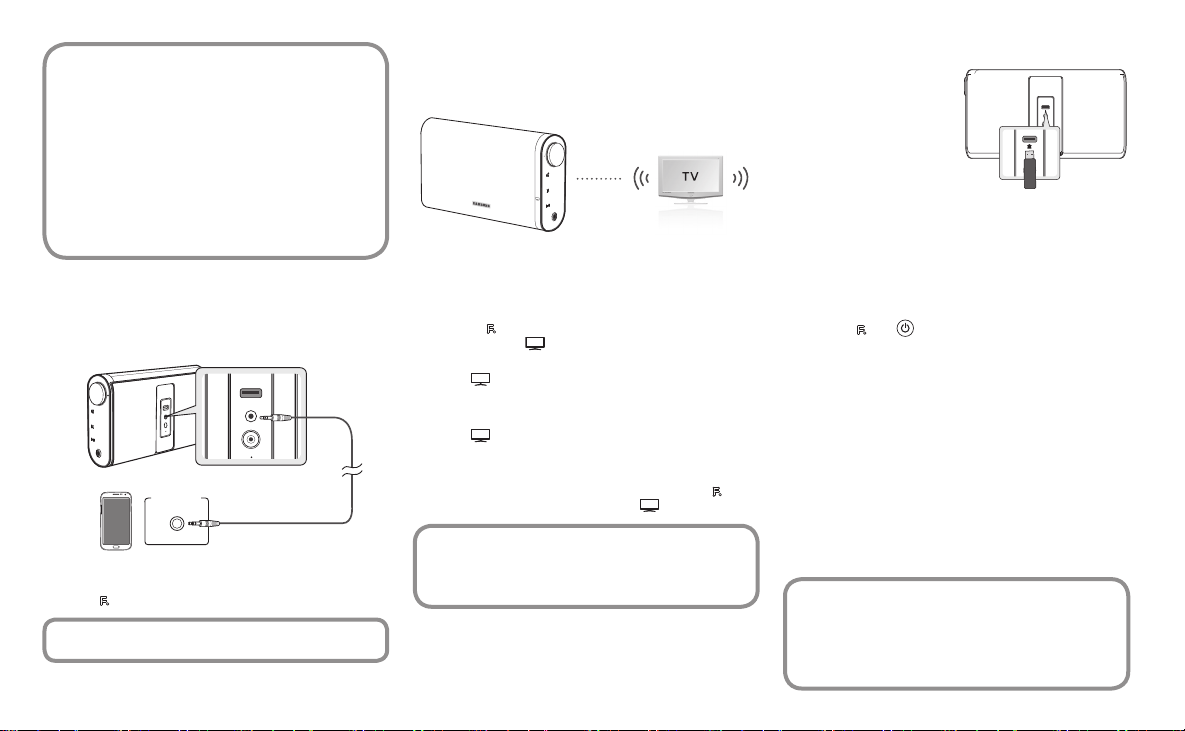
CONNECTING AN AUDIO DEVICE USING AUX IN
This section explains how to connect the unit to an audio device.
This unit requires one audio analogue jack for connecting to an
audio device.
DC 14V 2.5A
AUX IN
SERVICE
5V 500mA
BASS
FUNC.
MUTE
VOL
OPEN
DC 14V 2.5A
AUX IN
5V 500mA
SERVICE
Earphones
jack
External device
Audio Cable
(not supplied)
Press the
FUNC.
button to select AUX function.
f Before moving or installing this product, be sure to turn off
the power and disconnect the power cord.
USING THE SOUNDSHARE FUNCTION
This section explains how to connect the Wireless Audio
Portable to Bluetooth compatible SAMSUNG TVs.
BASS
FUNC.
MUTE
VOL
Connect
1. Turn on the Samsung TV and Wireless Audio Portable.
• Set 'Add New Device' to 'On' in the TV's 'SoundShare
Settings' menu. (Refer to the TV's user manual for details.)
2. Press the
button to change the mode of the Wireless
Audio Portable to
. A message asking whether to proceed
with Bluetooth pairing appears.
• The
blinks in the standby mode.
3. Select <Yes> on the TV screen. The Wireless Audio Portable
pairs with the TV.
• The
indicator blinks, and then stops blinking.
• The Wireless Audio Portable Bluetooth pairing is complete.
• If you want to cancel an existing pairing and pair the
Wireless Audio Portable to another TV, press the
button for 3 seconds with the unit in
mode.
f SoundShare is supported by some Samsung TVs
released after 2012. Check whether your TV supports
SoundShare before you begin.
f Optimal pairing distance is 1m or less.
SOFTWARE UPGRADE
Samsung may offer upgrades for
the Wireless Audio Portable's
system  rmware in the future.
If an upgrade is offered, you can
upgrade the  rmware by
connecting a USB drive with the
rmware upgrade stored on it to
the Service (USB) port on your
Wireless Audio Portable.
Please visit Samsung.com to receive more information about
downloading upgrades  les.
To upgrade after you have downloaded the  rmware, follow
these steps:
1. Turn on the product.
2. Insert a USB drive containing the rmware upgrade into the
Service (USB) port on the back of the product.
3. Press the
and
BASS
FUNC.
MUTE
VOL
buttons for 5 seconds at the same time.
The update process starts.
• All LEDs indicators will blink during the update process.
4. The LEDs will turn off automatically after the update process
is complete.
• Do not disconnect the power or remove the USB drive
while upgrades are being applied.
• The product will turn off automatically after completing the
rmware upgrade.
• When  rmware is upgraded, settings you have made will
return to their default (factory) settings. We recommend
you write down your settings so that you can easily reset
them after the upgrade.
• When the battery indicator LED is red, do not update the
product. Doing so could cause the product to malfunction.
f If the  rmware fails to upgrade, we recommend formatting
the USB drive in FAT16 and trying again.
f For upgrading purposes, do not format the USB drive in
NTFS format because it is not a supported  le system.
f Depending on the manufacturer, the USB may not be
supported.
DC 14V 4A
AUX IN
5V 500mA
SERVICE
DC 14V 4A
AUX IN
5V 500mA
SERVICE
Prenesi priročnik v slovenščini (PDF, 10.80 MB)
(Upoštevajte okolje in natisnite ta priročnik le, če je res potrebno)

Loading…

Ocena

Povejte nam, kaj menite o Samsung DA-F60 Zvočnik, tako da oddate oceno izdelka. Ali želite deliti svoje izkušnje z izdelkom ali postaviti vprašanje? Oddajte komentar na dnu strani.
Ali ste zadovoljni z Samsung DA-F60 Zvočnik?
Da Ne
Bodite prvi, ki boste ocenili ta izdelek
0 glasovi

Pridružite se pogovoru o tem izdelku

Tukaj lahko delite svoje mnenje o Samsung DA-F60 Zvočnik. Če imate vprašanje, najprej natančno preberite priročnik. Zahtevo za priročnik lahko opravite z uporabo našega kontaktnega obrazca.

Več o tem priročniku

Zavedamo se, da je lepo imeti papirni priročnik za vaš Samsung DA-F60 Zvočnik. Priročnik lahko vedno prenesete z naše spletne strani in ga natisnete sami. Če želite imeti originalni priročnik, priporočamo, da kontaktirate Samsung. Morda bodo lahko zagotovili originalni priročnik. Ali iščete priročnik za vaš Samsung DA-F60 Zvočnik v drugem jeziku? Na naši domači strani izberite želeni jezik in poiščite številko modela, da preverite, ali je na voljo.

Specifikacije

Blagovna znamka Samsung
Model DA-F60
Kategorija Zvočniki
Vrsta datoteke PDF
Velikost datoteke 10.80 MB

Vsi priročniki za Samsung Zvočniki
Več priročnikov za Zvočniki

Pogosto zastavljena vprašanja o Samsung DA-F60 Zvočnik

Naša podporna ekipa išče uporabne informacije o izdelkih in odgovore na pogosta vprašanja. Če v pogosto postavljenih vprašanjih odkrijete nenatančnost, nam to sporočite prek obrazca za stik.

Zvočnik želim povezati s televizorjem s priključkom HDMI, katera vrata naj uporabim? Potrjeno

Uporabiti morate vrata HDMI-ARC, ki so posebej izdelana za priključitev zvočne opreme.

To je bilo koristno (1488) Preberi več

Kaj pravijo frekvence o mojem zvočniku? Potrjeno

Označuje obseg frekvenc, ki jih lahko proizvaja zvočnik. Večji razpon frekvenc bo zagotovil večje razlike v zvoku in bo ustvaril kakovostnejši zvok.

To je bilo koristno (795) Preberi več

Kdaj je moja glasba preglasna? Potrjeno

Zvoki nad 80 decibelov (dB) lahko poškodujejo sluh. Zvoki nad 120 dB takoj poškodujejo sluh. Resnost škode je odvisna od tega, kako pogosto in kako dolgo je zvok prisoten.

To je bilo koristno (477) Preberi več

Ali bluetooth deluje skozi stene in stropove? Potrjeno

Signal Bluetooth bo deloval skozi stene in strop, razen če so izdelani iz kovine. Glede na debelino in material stene lahko signal izgubi na moči.

To je bilo koristno (238) Preberi več

Do katere ravni hrupa je varno za otroke? Potrjeno

Otroci poškodujejo sluh hitreje kot odrasli. Zato je pomembno, da otrok nikoli ne izpostavljate hrupu, ki je močnejši od 85 dB. V primeru slušalk obstajajo posebni modeli za otroke. V primeru zvočnikov ali drugih situacij morate biti previdni, hrup ne preseže te ravni.

To je bilo koristno (212) Preberi več
Priročnik Samsung DA-F60 Zvočnik

Podobni izdelki

Sorodne kategorije

×
Download