Priročnik SilverCrest IAN 101438 Zvočnik

Potrebujete priročnik za vaš SilverCrest IAN 101438 Zvočnik? Spodaj si lahko brezplačno ogledate in prenesete PDF priročnik v slovenščini. Ta izdelek ima trenutno 6 pogosto zastavljeni vprašanji, 0 komentarjev in ima 0 glasov. Če to ni priročnik, ki ga želite, nas kontaktirajte.

Ali je vaš izdelek okvarjen in v priročniku ne najdete rešitve? Obiščite Repair Café za brezplačno popravilo.

Priročnik

Loading…
such cases, the device should not be used
until it has been inspected by authorised
service personnel. Only have the device
repaired by qualified personnel. Never
open the housing of the device. Only use
a clean, dry cloth for cleaning and never
use any corrosive liquids. To remove
stubborn dirt use a slightly moistened
cloth and a mild cleaning agent. Never
try to open the housing of the device as
this would void your warranty.
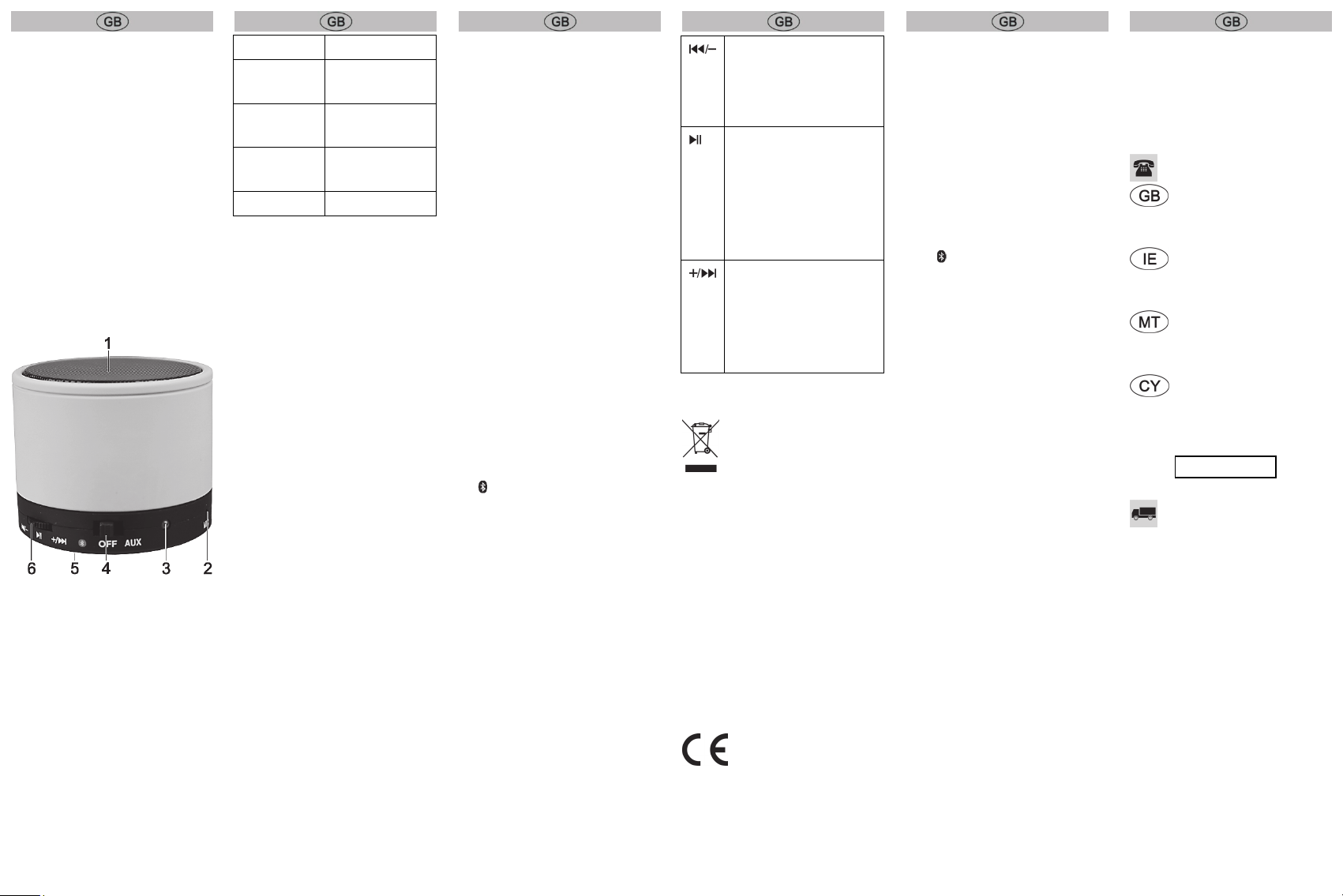
Control elements
1 Loudspeaker
2 Microphone
3 LED
4 Mode selection switch
5 Micro USB socket (at the back)
6 Multifunction button
LED
Refer to the table below for the different
statuses of the LED (3):
AUX operation Lights up green
Pairing mode Flashes alternately
orange/blue
Bluetooth
®
operation
Flashes blue every
5 seconds
Battery is
charging
Lights up orange
Battery low Flashes orange
First use
Before using for the first time, remove the
film from the bottom of the loudspeaker.
Charging the battery
Before the first use or when the built-in
battery is empty, you charge it as follows:
Set the mode selection switch (4) to
"OFF".
Connect the micro USB to USB cable to
the micro USB socket (5) and a free
USB socket of your computer when it is
switched on or a USB power supply
(not supplied).
The LED (3) lights up orange while the
battery is being charged and goes out
when the battery is fully charged.
Never cover the device while it is
charging, as it can become heated.
AUX operation
Set the volume of your audio source to
a low level.
Set the mode selection switch (4) to
"AUX".
Connect the micro USB to 3.5mm jack
cable to the micro USB socket (5) and
the 3.5mm jack plug to an external
audio source.
Adjust the volume on the external
audio source. In this mode the
multifunction button is disabled.
Bluetooth
®
operation
Bluetooth
®
operation enables wireless
hands-free operation of mobile phones,
for example. This loudspeaker allows you
to use a Bluetooth
®
enabled device. The
range of Bluetooth
®
operation is restricted
to approx. 10 metres. If your playback
device supports the Bluetooth
®
profile
A2DP, you can also transfer music
wirelessly to your loudspeaker. To be
able to remotely control the playback
device with the loudspeaker, it must also
support the AVRCP profile.
Depending on the manufacturer, model
and software version of the mobile phone
or playback device which is used, the
complete functionality of the loudspeaker
cannot be guaranteed in all cases.
Proceed as follows to connect the
loudspeaker with your mobile phone:
Set the mode selection switch (4) to
“.
The LED (3) now flashes blue a few
times. Wait until the LED (3) flashes
alternately blue/orange.
Now connect your mobile phone with
the loudspeaker via Bluetooth
®
. For
further details, please read the
instructions of your mobile phone.
Select the device "SBL 3.0 A1" from the
list of devices which are found and
establish the connection. If you are
asked for a PIN, enter "0000".
The loudspeaker confirms this with a
dual tone and the LED (3) flashes blue
approximately every 5 seconds as
soon as the connection has been
established.
The multifunction button (6) has the
following functions:
Turn briefly: Previous title
Turn for a longer
period:
Volume down
Press briefly: Play/Pause
or accept a call or terminate
dialling or the connection,
Press twice: Redial,
Press for 2 seconds:
Reject calls
Turn briefly:
Next title
Turn for a longer
period:
Volume up
Environmental information
The product bears the symbol
of a crossed-out wheelie bin. It
is therefore subject to the
European Directive 2012/19/EU.
All old electrical and electronic devices
must be separated from normal
household waste and disposed of at
designated state facilities. For further
information contact your local authorities,
waste disposal office or the shop where
you bought the device.
The built-in battery cannot be removed for
disposal.
Conformity information
This device meets the basic
requirements and other
relevant regulations of the EMC Directive
2004/108/EC, the Low Voltage
Directive 2006/95/EC, the R&TTE
Directive 1999/5/EC and the RoHS
Directive 2011/65/EU. The
full conformity declaration can be
downloaded from www.lidl-service.com.
Troubleshooting
The loudspeaker cannot be
switched on.
Charge the battery.
The Bluetooth
®
connection is not
established.
Set the mode selection switch (4) to
“.
The distance between the devices is
too large, reduce it.
The speaker is buzzing while
charging.
Set the mode selection switch (4) to
"OFF" or use the supplied micro USB
to USB cable for charging.
Warranty
Warranty of TARGA GmbH
This device is sold with three years
warranty from the date of purchase.
Please keep the original receipt in a safe
place as proof of purchase. Before using
your product for the first time, please read
the enclosed documentation. Should any
problems arise which cannot be solved in
this way, please call our hotline. Please
have the article number and, if available,
the serial number to hand for all
enquiries. If it is not possible to solve the
problem on the phone, our hotline
support staff will initiate further servicing
procedures depending on the fault.
Within the warranty period the product
will be repaired or replaced free of
charge as we deem appropriate. No new
warranty period commences if the
product is repaired or replaced.
Consumables such as batteries,
rechargeable batteries and lamps are not
covered by the warranty.
Your statutory rights towards the seller
are not affected or restricted by this
warranty.
Service
Phone: 0207 – 36 50 744
E-Mail:
Phone: 01 – 242 15 83
E-Mail:
Phone: 800 – 62 175
E-Mail:
Phone: 800 – 92 496
E-Mail:
IAN: 101438
Manufacturer
TARGA GmbH
Coesterweg 45
59494 SOEST
GERMANY
Prenesi priročnik v slovenščini (PDF, 1.06 MB)
(Upoštevajte okolje in natisnite ta priročnik le, če je res potrebno)

Loading…

Ocena

Povejte nam, kaj menite o SilverCrest IAN 101438 Zvočnik, tako da oddate oceno izdelka. Ali želite deliti svoje izkušnje z izdelkom ali postaviti vprašanje? Oddajte komentar na dnu strani.
Ali ste zadovoljni z SilverCrest IAN 101438 Zvočnik?
Da Ne
Bodite prvi, ki boste ocenili ta izdelek
0 glasovi

Pridružite se pogovoru o tem izdelku

Tukaj lahko delite svoje mnenje o SilverCrest IAN 101438 Zvočnik. Če imate vprašanje, najprej natančno preberite priročnik. Zahtevo za priročnik lahko opravite z uporabo našega kontaktnega obrazca.

Več o tem priročniku

Zavedamo se, da je lepo imeti papirni priročnik za vaš SilverCrest IAN 101438 Zvočnik. Priročnik lahko vedno prenesete z naše spletne strani in ga natisnete sami. Če želite imeti originalni priročnik, priporočamo, da kontaktirate SilverCrest. Morda bodo lahko zagotovili originalni priročnik. Ali iščete priročnik za vaš SilverCrest IAN 101438 Zvočnik v drugem jeziku? Na naši domači strani izberite želeni jezik in poiščite številko modela, da preverite, ali je na voljo.

Specifikacije

Blagovna znamka SilverCrest
Model IAN 101438
Kategorija Zvočniki
Vrsta datoteke PDF
Velikost datoteke 1.06 MB

Vsi priročniki za SilverCrest Zvočniki
Več priročnikov za Zvočniki

Pogosto zastavljena vprašanja o SilverCrest IAN 101438 Zvočnik

Naša podporna ekipa išče uporabne informacije o izdelkih in odgovore na pogosta vprašanja. Če v pogosto postavljenih vprašanjih odkrijete nenatančnost, nam to sporočite prek obrazca za stik.

Kakšna je številka modela mojega izdelka SilverCrest? Potrjeno

Čeprav imajo nekateri izdelki SilverCrest alternativno številko modela, imajo vsi številko IAN, s katero je izdelek mogoče identificirati.

To je bilo koristno (3783) Preberi več

Zvočnik želim povezati s televizorjem s priključkom HDMI, katera vrata naj uporabim? Potrjeno

Uporabiti morate vrata HDMI-ARC, ki so posebej izdelana za priključitev zvočne opreme.

To je bilo koristno (1488) Preberi več

Kaj pravijo frekvence o mojem zvočniku? Potrjeno

Označuje obseg frekvenc, ki jih lahko proizvaja zvočnik. Večji razpon frekvenc bo zagotovil večje razlike v zvoku in bo ustvaril kakovostnejši zvok.

To je bilo koristno (795) Preberi več

Kdaj je moja glasba preglasna? Potrjeno

Zvoki nad 80 decibelov (dB) lahko poškodujejo sluh. Zvoki nad 120 dB takoj poškodujejo sluh. Resnost škode je odvisna od tega, kako pogosto in kako dolgo je zvok prisoten.

To je bilo koristno (477) Preberi več

Ali bluetooth deluje skozi stene in stropove? Potrjeno

Signal Bluetooth bo deloval skozi stene in strop, razen če so izdelani iz kovine. Glede na debelino in material stene lahko signal izgubi na moči.

To je bilo koristno (238) Preberi več

Do katere ravni hrupa je varno za otroke? Potrjeno

Otroci poškodujejo sluh hitreje kot odrasli. Zato je pomembno, da otrok nikoli ne izpostavljate hrupu, ki je močnejši od 85 dB. V primeru slušalk obstajajo posebni modeli za otroke. V primeru zvočnikov ali drugih situacij morate biti previdni, hrup ne preseže te ravni.

To je bilo koristno (212) Preberi več
Priročnik SilverCrest IAN 101438 Zvočnik

Podobni izdelki

Sorodne kategorije

×
Download